
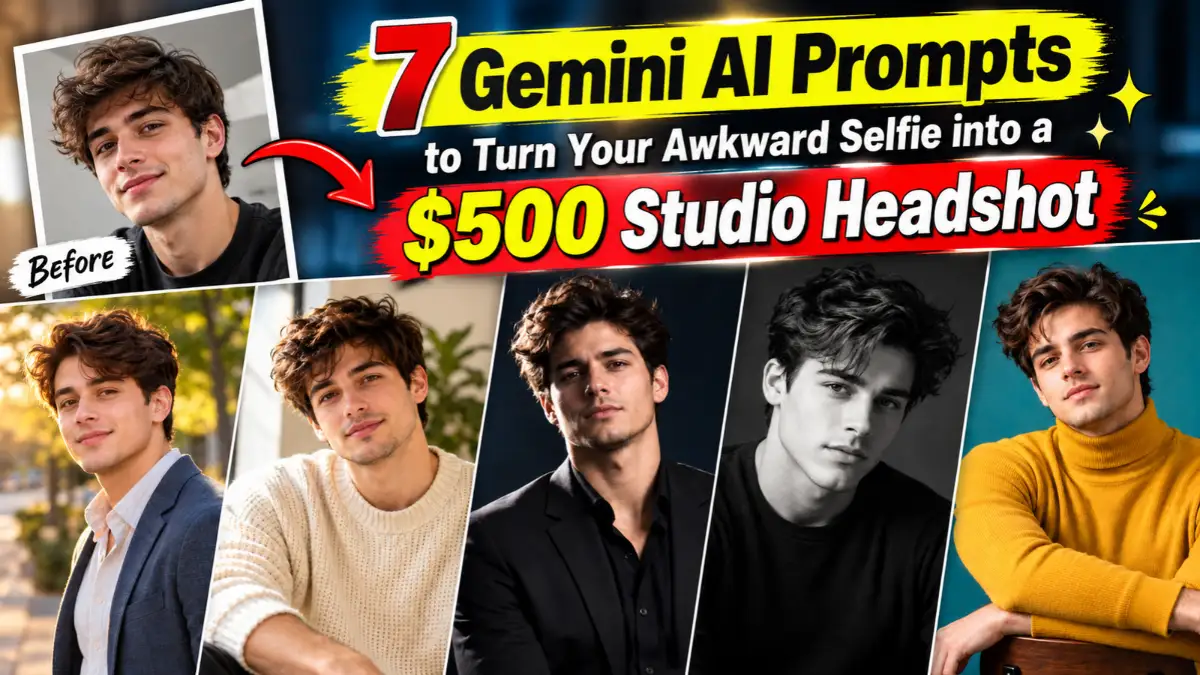
A professional headshot session can easily cost hundreds of dollars, and most of us just need one clean photo for LinkedIn, a resume, or an Instagram bio. With Gemini’s image editing (the Nano Banana model), you can upload a regular selfie and ask for a studio-style result instead.
Below are seven prompts, each built for a different look: corporate, editorial, moody, outdoor, and more. Every prompt tells Gemini to keep your face unchanged, so the photo still looks like you.
Quick Answer: How to Use These Prompts
- Open Gemini and start a new chat with image editing or image generation available.
- Upload one clear selfie. Face the light, keep your face fully visible, and avoid heavy filters.
- Paste one prompt below and send it.
- If something is off, reply with one small change, such as “make the background slightly darker.”
Before You Start: Get a Better Source Selfie
The prompt matters, but the selfie matters just as much. A few small things make a big difference:
- Use daylight: stand facing a window instead of a ceiling light.
- Hold the phone at eye level: a low or high angle distorts your face.
- Use the rear camera if you can: it is usually sharper than the front camera.
- Skip beauty filters: they smooth out the details Gemini needs to keep your face accurate.
- Show your shoulders: it gives the AI room to build a natural suit, shirt, or jacket.
The 7 Studio Headshot Prompts
1. Classic Corporate Headshot (Gray Backdrop)

The safest option for LinkedIn, company websites, and resumes. Clean, neutral, and professional.
Use the attached reference image and keep the person’s face, facial features, and identity exactly the same, with no changes to their appearance. Transform the casual selfie into a professional corporate headshot shot in a photography studio. The person wears a tailored charcoal blazer over a crisp white shirt, shoulders angled slightly toward the camera, with a calm, confident, natural smile. Plain mid-gray seamless backdrop with a soft gradient. Lit with a large softbox at 45 degrees and a subtle fill light, with a gentle rim light separating the shoulders from the background. Shot with an 85mm portrait lens at f/4, chest-up framing, eyes tack-sharp, fine skin texture preserved, ultra-high-resolution detail, clean and premium finish. Vertical 4:5 ratio.
Best for: LinkedIn profile photos, resumes, company team pages.
2. Natural Window-Light Editorial Portrait
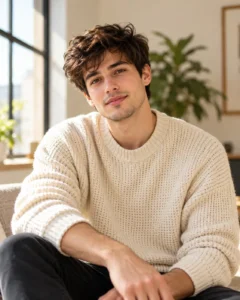
Softer and more personal. This one suits founders, writers, and creators who want to look approachable.
Keep the face and identity from the uploaded photo completely unchanged, exactly as it appears in the reference, with no alteration to facial features. Recreate the image as an editorial portrait lit by soft daylight from a large window on the left. The person sits relaxed in a cream knit sweater, head tilted a few degrees, with a light, genuine half-smile and eyes looking straight at the lens. Warm off-white wall behind, a blurred plant in the corner. Shot on a 50mm lens at f/2, waist-up, shallow depth of field, gentle shadow falloff across the cheek, natural skin texture with visible pores, crisp focus on the eyes, high-resolution magazine-quality detail. 4:5 vertical.
Best for: About pages, author bios, newsletter profiles.
3. Dark and Moody Executive Portrait
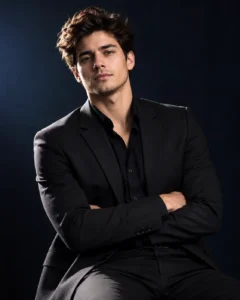
Dramatic, high-contrast, and confident. It works well for leadership profiles and personal brands.
Using the attached selfie as the reference, the person’s face, features, and identity must stay exactly as they are, with nothing altered. Create a dark, moody executive portrait against a deep black-navy background. The person wears a black suit jacket and dark open-collar shirt, arms folded loosely, with a serious but approachable expression. Single key light from the side creating sculpted shadows (Rembrandt-style), a faint edge light on the hair and shoulders. 85mm lens, f/2.8, three-quarter body framing, rich contrast, deep blacks without losing facial detail, razor-sharp eyes, ultra-clean high-definition finish. 4:5 vertical.
Best for: Speaker bios, podcast guests, personal brand websites.
4. Bright Outdoor Lifestyle Headshot
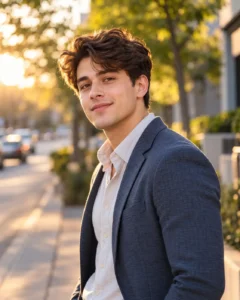
For people who want a relaxed, friendly look that still feels professional.
Treat the attached image as the identity reference: preserve the person’s face and every facial feature precisely, with no modification to how they look. Place them outdoors in soft late-afternoon golden light on a quiet tree-lined street, with the background gently blurred into warm green and amber tones. They wear a light-colored shirt with a casual unstructured blazer, standing with one shoulder toward the camera and looking back at the lens with a warm smile. Shot on a 70mm lens at f/2.2, chest-up, natural sunlight glow on the hair, true-to-life skin tones, sharp facial detail, high-resolution and polished. 4:5 vertical.
Best for: Instagram bios, freelancer profiles, dating-profile-style photos.
5. Black-and-White Fine Art Headshot
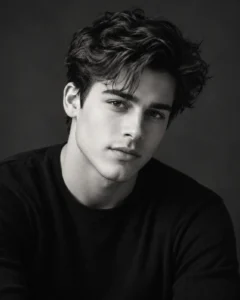
A timeless look that hides distracting clothing colors and puts the focus on expression.
Based on the supplied reference photo, the face, facial structure, and identity are to remain identical to the original, with no changes whatsoever. Convert the scene into a classic black-and-white studio portrait with a dark gray backdrop. The person wears a simple dark crew-neck top, with a subtle, thoughtful expression and a slight chin-down angle, eyes locked on the camera. Soft directional light from the front-left with a gentle fill, film-like tonal range, fine grain kept minimal. 100mm lens at f/4, tight head-and-shoulders framing, extremely sharp eyes and skin texture, premium fine-art print quality. 4:5 vertical.
Best for: Artists, photographers, creative portfolios.
 Forget Paying $80 for an Aura Reading: This Gemini AI Prompt Creates Glowing Aura Portraits
6. Modern Office Environmental Portrait

A headshot with context. The background suggests a real workplace without stealing attention.
The uploaded photo is the single source for the person’s identity: keep their face and features exactly the same and do not retouch or reshape anything about their appearance. Build a modern environmental portrait in a bright, minimal office with large windows and a softly blurred glass-walled meeting room behind. The person wears a navy blazer and light blue shirt, leaning slightly against a clean desk with arms relaxed, looking confident and open. Daylight from the windows as the main light, with a soft reflector fill under the chin. 35mm lens at f/2.8, knees-up framing, strong depth separation, crisp detail on the face and fabric textures, realistic color, high-resolution finish. 3:4 ratio.
Best for: Business websites, startup team pages, press kits.
7. Creative Color-Backdrop Headshot
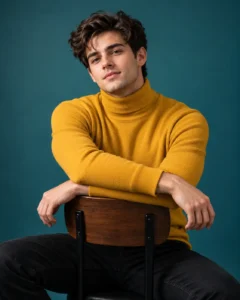
A bolder, magazine-style option that stands out in a feed or on a portfolio page.
Working from the attached reference image, hold the person’s face, facial features, and identity exactly as they are, with no changes at all to their look. Style it as a contemporary studio portrait against a solid muted teal backdrop. The person wears a mustard-yellow turtleneck, sitting sideways on a stool with an arm resting on the backrest, head turned toward the camera with a relaxed half-smile. Clean beauty-dish key light with a soft fill, subtle shadow on the backdrop. 85mm lens at f/5.6, full-sharp focus from eyes to shoulders, accurate skin tones, rich but natural color, ultra-sharp high-definition detail. 4:5 vertical.
Best for: Creators, designers, magazine-style bios.
How to Fix Common Problems
- Face looks slightly different: upload a clearer, front-facing selfie and send a short follow-up asking Gemini to match the original face more closely.
- Skin looks too smooth: add “keep natural skin texture and pores, no heavy retouching.”
- Background feels fake: ask for fewer objects and a softer blur.
- Clothes look wrong: name the exact garment, color, and fit instead of saying “formal wear.”
- Result feels soft: ask for sharper eyes and clearer fabric detail, then regenerate.
Tips to Get a More Premium Result
- Change one thing at a time when refining. Big rewrites usually make results worse.
- Pick the right ratio: 4:5 works for most profiles, while 1:1 suits circular avatars.
- Name the lens and light: terms like “85mm” and “softbox at 45 degrees” give Gemini clearer photographic direction than “professional photo.”
- Check the details before posting: look closely at teeth, hands, collars, and jewelry, since AI edits can slip there.
FAQ
Will Gemini keep my face the same?
These prompts ask it to, and a clear, well-lit selfie helps a lot. Results can still vary, so always compare the output with your original photo.
Which prompt is best for LinkedIn?
Prompt 1 (gray backdrop) or Prompt 6 (modern office) are the safest choices for professional profiles.
Can I use these prompts in other AI tools?
Yes, they can be adapted for other image tools that accept a reference photo, though results and face accuracy will differ by tool.
Is it okay to use an AI headshot for work?
Some employers and platforms have their own rules about edited or AI-generated photos. Check them before uploading, and keep the image a fair likeness of you.
Can I change the outfit?
Yes. Replace the clothing in any prompt with your own description, such as a black turtleneck, a denim jacket, or a saree with a minimal blazer.
Final Thoughts
Start with Prompt 1 if you need a safe professional photo, and try Prompts 3 or 7 if you want something more distinctive. A good source selfie plus one or two small refinements is usually enough to get a clean, studio-style headshot.

Hi, I’m Deepak Verma. I run MKEdit because I got a little obsessed with how good AI photo prompts can look when they’re written properly and paired with the right AI tools to generate high-quality images. Everything you see here, I’ve generated and tested myself first. If it’s on the site, it’s because it actually gave a good result — not just a random idea I typed once
2 thoughts on “7 Gemini AI Prompts to Turn Your Awkward Selfie into a $500 Studio Headshot”