
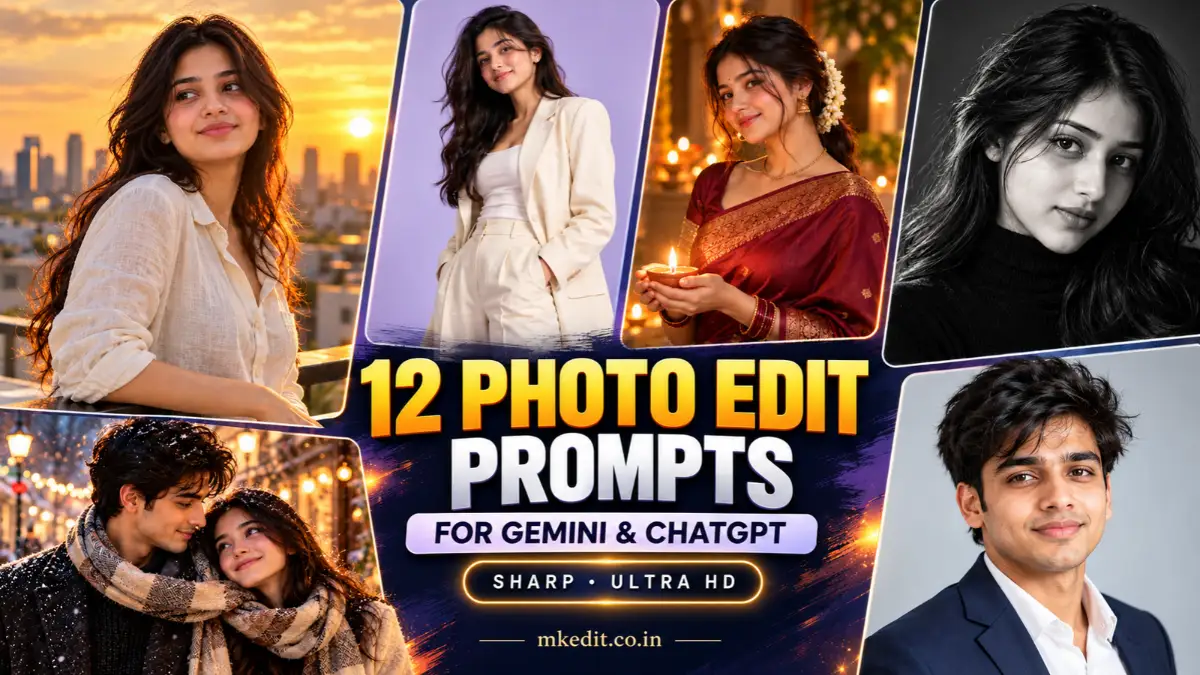
Most photo edit prompts fail for one reason: the face changes. You upload a clear selfie, and the result looks like a cousin of you. The prompts below are written to avoid that. Each one starts by locking your identity, then describes the edit in detail so the output stays sharp and clean.
They work with a photo upload in Gemini, ChatGPT and most other image tools that accept a reference image. Results vary from tool to tool, so treat every prompt as a starting point and adjust it.
How to Use These Prompts
- Upload one clear, well-lit photo of yourself (or the couple) where the face is visible and not blurred.
- Paste the prompt in the same message as the image.
- If the face drifts, send a follow-up: “Keep the face closer to the original photo.”
- Ask for a portrait or square ratio in the prompt if the tool allows it.
Girl Photo Edit Prompts
1. Golden Hour Rooftop Portrait
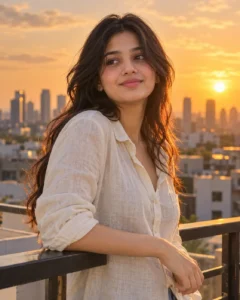
Warm, soft sunset light with a city skyline behind. Works best with a waist-up photo.
Work from the uploaded photo and preserve her face, features and identity completely, with no beautification or reshaping. Place her on a rooftop at golden hour, leaning lightly on a railing, looking slightly past the camera. Warm sunlight rims her hair, the city skyline is softly blurred behind her. She wears a cream linen shirt with the sleeves rolled. Shot at eye level, 85mm look, shallow depth of field, natural skin texture, ultra HD, crisp detail in hair and fabric. Vertical 4:5.
Best for: Instagram posts and profile pictures.
2. Rainy Window Cafe Mood
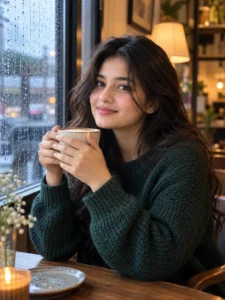
A quiet, cinematic café scene with soft window light.
Using the photo I attached, her face has to stay identical to the original, so don’t change her expression style or any facial details. Show her seated by a rain-streaked café window, both hands around a ceramic cup. Soft cool daylight on one side of her face, warm lamp glow in the background. Dark green knit sweater, loose wavy hair. Camera slightly to the side at chest height, 50mm feel, gentle film-like color, sharp focus on her eyes, ultra HD clarity. Portrait 3:4.
Best for: Moody, aesthetic feed posts.
3. Studio Fashion Look on a Pastel Backdrop

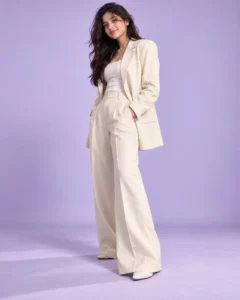
Clean magazine-style lighting. Good for outfit changes.
Take the person from my uploaded image and make sure her face and identity remain exactly as they are in the original. Put her in a minimal studio against a pale lilac seamless backdrop. She wears an oversized cream blazer with wide trousers and stands in a relaxed three-quarter pose, one hand in her pocket. Soft beauty-dish lighting, subtle shadow on the floor, full-body framing with a slightly low camera angle. Realistic skin, tack-sharp fabric texture, premium ultra HD finish. Vertical 4:5.
Best for: Fashion-style profile photos and brand pages.
4. Traditional Festival Portrait
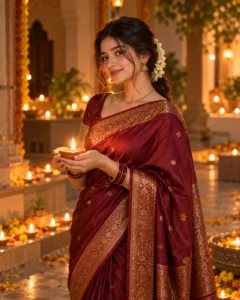
A warm portrait for festive occasions, with natural diya-style lighting.
Based on the reference photo, don’t alter her face, skin tone or any recognizable feature; she must look like the same person. Dress her in a deep maroon silk saree with fine gold border, small traditional jewelry and a light flower garland in her hair. She stands in a softly lit courtyard with glowing oil lamps along the floor, hands gently holding a lamp. Warm low-key lighting, creamy bokeh from the lamps, medium shot at slight low angle. Clean detail in fabric and jewelry, ultra HD sharpness. Portrait 4:5.
Best for: Festival greetings and WhatsApp status images.
5. Soft Monochrome Studio Portrait
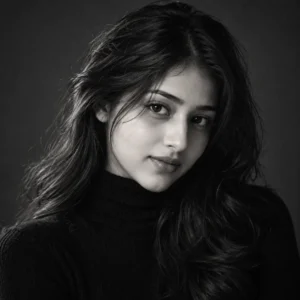
A timeless black-and-white edit that depends on light and expression.
Keep the face from the attached picture completely faithful to the original, without smoothing it or changing proportions. Convert the scene into a refined black-and-white studio portrait: dark gray background, single soft key light from the left, gentle falloff across her cheek. She wears a simple black turtleneck, chin slightly lowered, eyes toward the lens. Close head-and-shoulders framing, 105mm compression, rich tonal range, fine grain, very sharp eyes and hair strands, ultra HD. Square 1:1.
Best for: Artistic portraits and photography-style profiles.
Couple Photo Edit Prompts
For couples, upload one photo that shows both faces clearly. If the tool struggles, name each person: “the person on the left” and “the person on the right.”
6. Beach Walk at Sunset
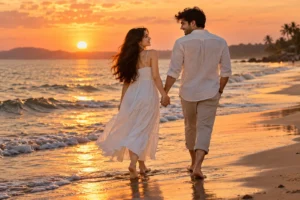
Treat the uploaded couple photo as the identity source: both faces, hairstyles and skin tones must match the original with nothing altered. Place the two of them walking barefoot along the edge of the water at sunset, holding hands and laughing toward each other. Light waves reflect the orange sky. She wears a white sundress, he wears a light linen shirt with rolled trousers. Wide shot from behind and slightly to the side, 35mm look, warm backlight, natural motion in clothes and hair, crisp detail, ultra HD. Landscape 3:2.
Best for: Anniversaries and travel-style couple posts.
7. Cozy Winter Street Date
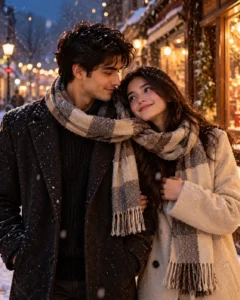
Please retain both people’s faces and overall identity exactly as in my original photo, with no restyling of their features. Show them on a snowy evening street lined with warm string lights, sharing one scarf and standing close, her head leaning toward his shoulder. Soft snowflakes in the air, gentle glow on their faces from a nearby shopfront. Wool coats in muted tones. Medium shot at chest height, 50mm, shallow depth of field, cinematic warm-and-cool contrast, clean sharpness, ultra HD. Vertical 4:5.
Best for: Romantic winter posts and greeting images.
8. Vintage Film Couple Portrait
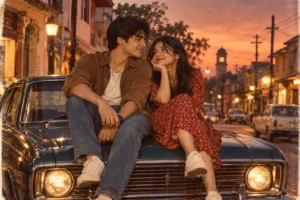
Stay true to the faces in the uploaded image; the couple must be easily recognizable as the same two people, so don’t change anything about their appearance. Edit them into a 1990s film-photo look: seated on the hood of a vintage car in a quiet small-town street at dusk. Slightly faded colors, soft grain, warm highlights, natural candid pose with a shared smile. Camera at a three-quarter angle, 35mm film feel, but keep the faces and edges detailed and sharp, ultra HD scan quality. Landscape 3:2.
Best for: Retro-themed couple edits.
Trending Photo Edit Prompts
9. Cinematic Movie Poster Look
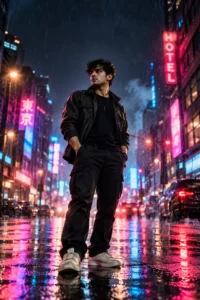
Using this reference photo, the face and identity should be left exactly unchanged, no stylization applied to the person. Turn it into a cinematic movie-poster composition: the subject stands in the center of a rain-soaked neon street at night, dark jacket, serious expression, reflections of pink and blue signs on the wet ground. Low camera angle, strong rim light, subtle haze, space at the top for a title. Rich contrast, detailed textures, premium ultra HD sharpness. Vertical 2:3.
Best for: Trending poster-style edits and thumbnails.
10. Minimal Clean Studio Headshot

I’m attaching a photo, so keep my face, features and likeness as they appear there, with no retouching that changes who I am. Create a professional headshot against a soft light-gray background. Dark navy blazer over a white shirt, shoulders angled slightly, relaxed natural smile. Large soft window-style key light with a subtle fill, neutral color grading. Head-and-shoulders framing, 85mm look, sharp eyes, clean fabric detail, ultra HD. Square 1:1.
Best for: LinkedIn, resumes and business profiles.
11. Dreamy Flower Field Portrait
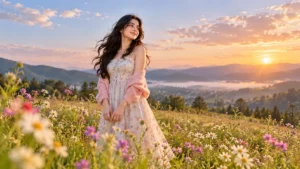
The person in the uploaded photo needs to look exactly like themselves: the same face, same features, nothing replaced or smoothed away. Place them standing in a wide wildflower meadow in the soft light just after sunrise, a light breeze moving their hair and clothing. Pastel sky, tiny glowing dust particles in the air, flowers in the foreground gently out of focus. Wide-angle shot from slightly below, airy color palette, sharp subject detail, ultra HD. Landscape 16:9.
Best for: Wallpapers and soft aesthetic posts.
12. Urban Streetwear Night Shot
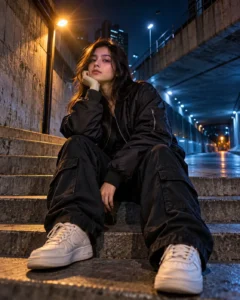
Carry over the face from the reference image without any change; his or her identity and features must be the same as the original. Show the subject in a black oversized bomber jacket and cargo pants, sitting on concrete steps in an empty city underpass at night. Cool blue ambient light with one warm streetlamp creating a strong highlight on the side of the face. Slightly low, wide angle with a hint of lens distortion, deep shadows, crisp textures on fabric and concrete, ultra HD sharpness. Vertical 4:5.
Best for: Streetwear and attitude-style portraits.
Tips for Sharper, More Realistic Results
- Start with a good photo. A blurry or heavily filtered upload usually gives a soft result.
- Keep one main edit per prompt. Changing outfit, background, lighting and style all at once can cause the face to drift.
- Name the lighting. “Soft window light” or “warm backlight” gives more control than “nice lighting.”
- Specify the framing. Waist-up, full-body or close-up changes the result a lot.
- Request the aspect ratio. 4:5 suits Instagram, 9:16 suits stories, 16:9 suits wallpapers.
- Iterate. Make a small follow-up request instead of rewriting the whole prompt.
Common Mistakes to Avoid
- Writing “beautiful, perfect face,” which often makes the tool reshape the face.
- Uploading a photo where the face is partly covered or turned away.
- Stacking too many styles, such as vintage, neon, studio and fantasy, in one prompt.
- Skipping the identity instruction. Without it, many tools treat the photo as loose inspiration.
FAQ
Do these prompts work in both Gemini and ChatGPT?
Yes, as long as the tool lets you upload an image with your text. Output style differs between tools, so adjust the wording if something looks off.
How do I keep my face the same?
Begin the prompt with a clear identity instruction, upload a sharp front-facing photo, and avoid changing too many things at once.
Can I use these for a couple photo?
Yes. Upload a photo with both faces clearly visible and use the couple prompts above. Describe each person by position if needed.
Why does my result look soft?
Low-resolution uploads and overly complicated prompts are the usual causes. Use a clean source image and simplify the scene.

Hi, I’m Deepak Verma. I run MKEdit because I got a little obsessed with how good AI photo prompts can look when they’re written properly and paired with the right AI tools to generate high-quality images. Everything you see here, I’ve generated and tested myself first. If it’s on the site, it’s because it actually gave a good result — not just a random idea I typed once
1 thought on “12 Photo Edit Prompts for Gemini and ChatGPT (Sharp, Ultra HD Results)”