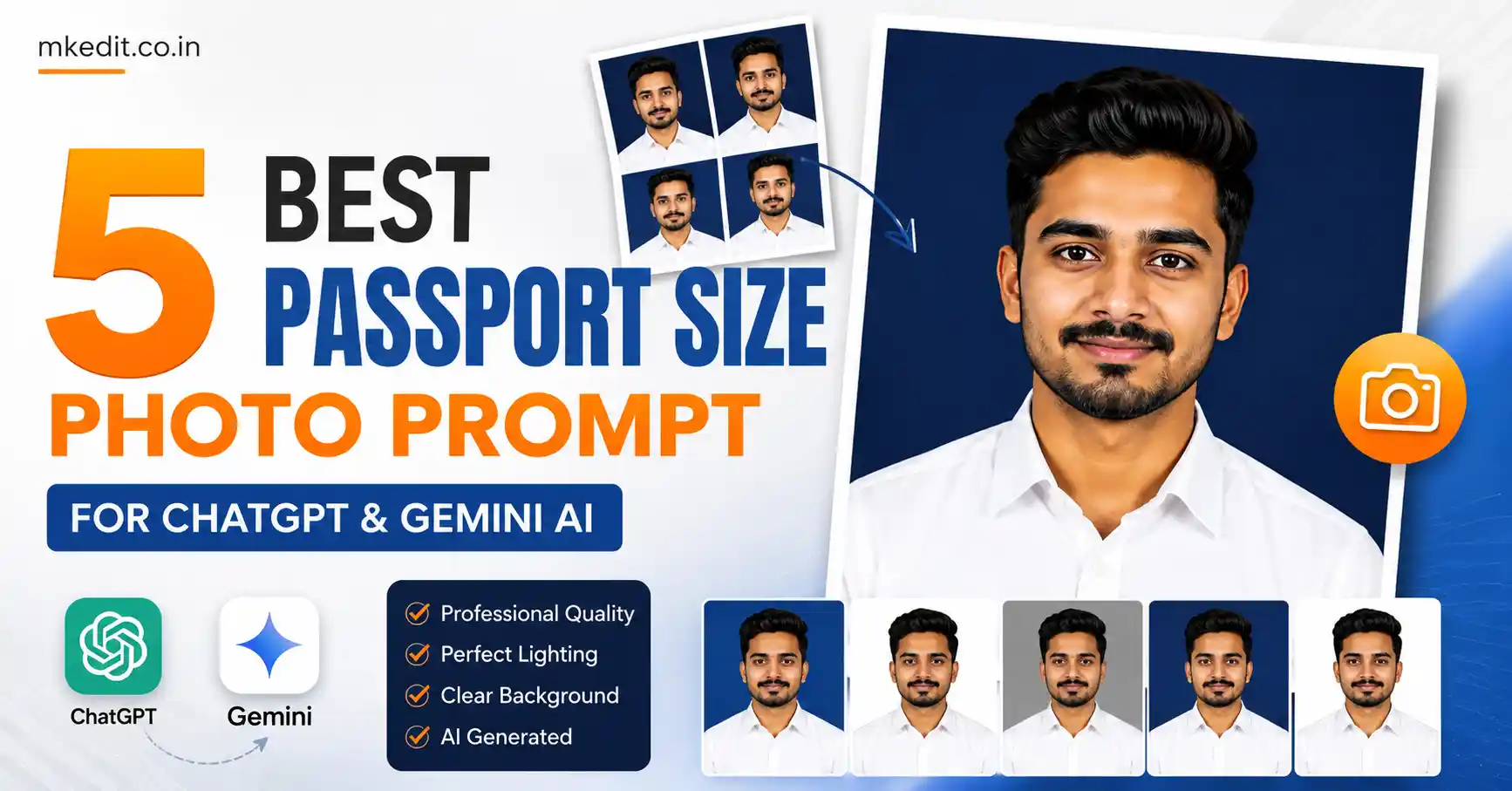
If you’re looking for the best passport size photo prompt for ChatGPT & Gemini AI, you’ve landed on the right page. Today, AI can create professional passport photographs that look like they were captured inside an expensive photography studio.
Here’s the thing — the quality of your final image depends almost entirely on the prompt you use. A simple prompt gives average results, while a detailed prompt preserves your facial identity, improves lighting, and creates a government-style passport photo that’s clean and professional.
In this guide, you’ll find five carefully written prompts that work beautifully with both Google Gemini AI and ChatGPT image generation models.
What is a Passport Size Photo Prompt for ChatGPT & Gemini AI?
A passport size photo prompt is a detailed instruction that tells AI exactly how your passport photograph should look. It includes information about your facial identity, clothing, lighting, background, camera angle, framing, and image quality.
Unlike ordinary prompts, these prompts focus heavily on identity preservation. That means your face remains exactly the same while the AI simply recreates it in a professional passport-photo style.
Whether you need a passport photo, visa photograph, job application image, ID card picture, or official document photo, these prompts help you create studio-quality results without visiting a photographer.
Why is Passport Size Photo Prompt for ChatGPT & Gemini AI Trending?
AI image editing has improved dramatically over the last year. Google Gemini and ChatGPT can now generate highly realistic passport photographs that preserve facial identity surprisingly well.
Many people now create passport photos at home instead of visiting a studio. It saves time, reduces cost, and gives you complete control over clothing, lighting, and final image quality.
Trust me, using a proper passport size photo prompt makes a huge difference. The AI understands exactly how a government-style passport photograph should be framed and illuminated.
5 Best Passport Size Photo Prompt for ChatGPT & Gemini AI — Copy Paste Ready
Prompt 1: Professional White Shirt Passport Photo
This prompt creates a realistic passport-size portrait with perfect face preservation, balanced studio lighting, and official passport framing suitable for most applications.
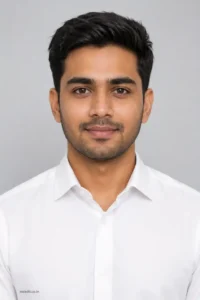
✅ Works on: Gemini & ChatGPT | 📱 Mobile friendly
Prompt 2: Embassy & Visa Studio Passport Portrait
This version is designed for visa applications and official document photos where natural skin tones, accurate framing, and facial consistency are extremely important.
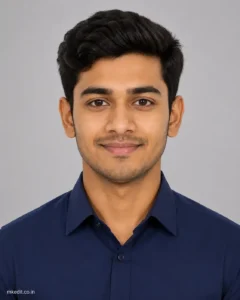
Use the uploaded reference photo strictly as the facial identity reference. Preserve 100% of the person’s facial structure, hairstyle, skin tone, eyebrows, eyes, nose, lips, ears, jawline, facial proportions, and every natural facial characteristic without any modification. Do not beautify, reshape, or alter the identity in any way.Create an ultra-realistic vertical passport-style studio portrait with the subject wearing a premium solid dark navy blue formal button-up shirt with a neatly pressed collar. Keep the head perfectly upright, shoulders straight and balanced, and maintain direct eye contact with the camera. Use a relaxed, natural closed-mouth smile with a confident yet professional expression.Place the subject against a smooth light gray studio background with a subtle soft gradient, free from any patterns, objects, or distractions. Use premium softbox studio lighting with even illumination across the face, soft natural shadows, realistic skin texture, and true-to-life colors. Capture the image using a DSLR 85mm portrait lens with shallow depth of field, HDR photography, razor-sharp facial details, and professional passport-photo framing. Ensure both ears are clearly visible, the face is perfectly centered, and there is adequate space above the head following international passport portrait standards.The final image should look like it was taken in a high-end professional photography studio—photorealistic, ultra-detailed, natural, and 8K quality. Add a small, elegant “mkedit.co.in” signature in the bottom-left corner without distracting from the portrait.
✅ Works on: Gemini & ChatGPT | 📱 Mobile friendly
Prompt 3: Printable 3×3 Passport Photo Sheet
This prompt creates nine identical passport-size photographs arranged in a clean printable grid. It is perfect for passport offices, visa applications, government forms, and document printing.
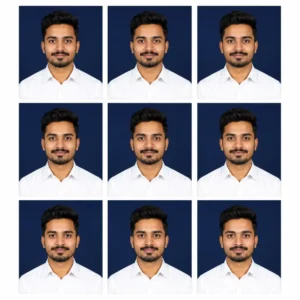
✅ Works on: Gemini & ChatGPT | 📱 Mobile Friendly
Prompt 4: Blue Background Official Passport Portrait
This prompt generates a modern passport-style portrait with a professional blue studio background while preserving your original facial identity perfectly.
 Guru Purnima AI Photo Editing Prompt 2026
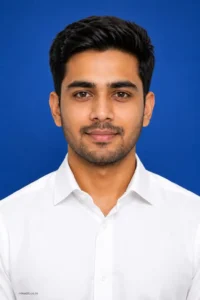
Use the uploaded reference image as the exact identity reference. Preserve 100% of the person’s facial identity, including facial structure, hairstyle, eyebrows, eyes, nose, lips, ears, jawline, skin tone, facial proportions, and all natural facial details without any alteration. Do not beautify, age, de-age, or modify any recognizable features.Create an ultra-realistic vertical passport-style studio portrait of the subject wearing a premium crisp white business shirt with a neatly pressed collar. The subject should face directly toward the camera with a natural, confident closed-mouth expression. Keep the head perfectly upright, shoulders level, and ensure both ears are fully visible. The composition should be perfectly centered with the head occupying approximately 70–80% of the frame, suitable for passport, visa, ID card, LinkedIn profile, and official document use.Replace the background with a smooth royal blue studio backdrop featuring a subtle soft gradient (slightly lighter at the center and darker toward the edges), clean and distraction-free.Use professional softbox studio lighting from both sides with gentle fill lighting to eliminate harsh shadows while maintaining natural facial depth. Capture realistic skin texture, visible skin pores, lifelike eye reflections, accurate white balance, and premium color grading.Camera settings: DSLR full-frame camera, 85mm portrait lens, f/2.8 aperture, ISO 100, ultra-sharp focus, shallow depth of field, HDR photography, photorealistic 8K resolution.Overall style: premium professional corporate headshot, natural colors, highly realistic, studio quality, suitable for passports, visas, official IDs, resumes, and business profiles.
Negative Prompt: cartoon, anime, CGI, illustration, painting, low quality, blurry, noisy, oversharpened, overexposed, underexposed, distorted face, asymmetrical eyes, altered facial features, extra ears, cropped head, tilted head, smiling with teeth, accessories, glasses, hats, jewelry, watermark, logo, text, background objects, wrinkles in clothing, unrealistic skin, plastic skin, artificial lighting.
✅ Works on: Gemini & ChatGPT | 📱 Mobile Friendly
Prompt 5: Passport Photo Sheet Prompt
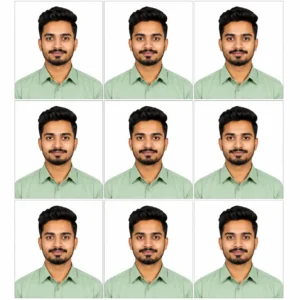
Use the uploaded reference image as the exact facial identity reference. Preserve 100% of the person’s facial structure, face shape, hairstyle, hairline, eyebrows, eyes, nose, lips, ears, jawline, beard or mustache, skin tone, facial proportions, and natural expression without altering any recognizable feature.Create an ultra-realistic professional passport-size studio portrait of the subject wearing a premium light sage green formal collared shirt with a clean, wrinkle-free appearance. Use a pure white seamless studio background (#FFFFFF) that is evenly lit with no gradients, shadows, or texture, making it suitable for official passport and visa photo requirements.Apply professional softbox studio lighting from both sides with gentle front fill lighting to produce natural skin tones, realistic facial depth, soft shadows, and accurate color reproduction. Maintain authentic skin texture with subtle pores and fine facial details while avoiding excessive beauty retouching or artificial smoothing.Capture the portrait using the look of a full-frame DSLR camera with an 85mm portrait lens (f/4), ensuring edge-to-edge sharpness, true-to-life colors, HDR lighting, and exceptional facial clarity. The subject should face directly toward the camera with straight shoulders, head centered, eyes looking into the lens, and a relaxed closed-mouth natural expression.Generate nine identical passport-size photographs arranged in a perfectly aligned 3×3 printable grid with equal spacing, thin clean margins, and consistent framing across all photos. Every image must be an exact duplicate in position, lighting, expression, and color. Ensure the sheet appears professionally printed and ready for passport, visa, government ID, or official document use.Quality Requirements: Hyper-realistic, photorealistic, ultra-detailed, true-to-life skin texture, natural lighting, DSLR-quality portrait, HDR, studio-grade photography, crisp focus, noise-free, print-ready, 8K Ultra HD, professional passport photography, premium commercial studio finish.
✅ Works on: Gemini & ChatGPT | 📱 Mobile Friendly
How to Use These Passport Size Photo Prompt for ChatGPT & Gemini AI — Step by Step
- Open Google Gemini or ChatGPT with image generation enabled.
- Upload a clear, high-resolution reference photo where your face is fully visible and well lit.
- Copy any Passport Size Photo Prompt for ChatGPT & Gemini AI from this article.
- Paste the prompt into Gemini or ChatGPT and generate the image. If necessary, regenerate once for even better lighting and framing.
- Download the final image. For passport or visa applications, verify that it meets your country’s official photo size and background requirements before printing.
Tips to Get the Best Results from These Prompts
- Always upload the highest-quality reference photo possible. Clear facial details help AI preserve your identity more accurately.
- Keep the identity preservation instructions unchanged. Removing them may cause the AI to alter your facial features.
- Use a plain background and avoid sunglasses, hats, or heavy shadows in the reference image.
- Professional camera details like DSLR 85mm lens, soft studio lighting, and HDR photography significantly improve realism.
- If you need passport photos for official documents, always verify the final dimensions, background color, head size, and other requirements specified by the issuing authority.
- Keep the small “mkedit.co.in” signature minimal so it doesn’t interfere with the usability of the generated preview image.
Frequently Asked Questions About Passport Size Photo Prompt for ChatGPT & Gemini AI
Can I use these prompts in both Google Gemini and ChatGPT?
Yes. These prompts are written in a universal format and work well with both Google Gemini AI and ChatGPT image generation models that support detailed prompts.
Will AI keep my face exactly the same?
If you upload a clear reference photo and keep the identity preservation instructions intact, AI can preserve your facial structure, skin tone, hairstyle, and overall appearance with excellent accuracy.
Can I use these AI-generated photos for passport or visa applications?
These prompts can create realistic passport-style photos, but official acceptance depends on the rules of the passport office, embassy, or government agency. Always check their latest requirements before submitting an AI-generated image.
Which background color works best for passport photos?
Most countries accept plain white, off-white, or light-colored backgrounds, while some require specific colors. Always follow the official guidelines for your application.
Why are detailed prompts better than short prompts?
Detailed prompts give the AI precise instructions about facial identity, camera settings, lighting, framing, and composition. This results in much more realistic, studio-quality passport photographs.
Final Words
If you want professional-looking passport photographs without visiting a studio, these Passport Size Photo Prompt for ChatGPT & Gemini AI are an excellent starting point. They focus on realistic identity preservation, balanced studio lighting, official framing, and ultra-HD image quality.
Here’s the thing — the better your reference photo and prompt, the better your final result will be. Feel free to customize the background, shirt style, or lighting while keeping the face-preservation instructions exactly the same for the most natural output.
We regularly publish the latest AI photo editing prompts, realistic portrait prompts, and Gemini AI editing guides on MKEdit.co.in. Bookmark this page and keep checking back for more copy-and-paste prompts that help you create stunning AI-generated images in just a few seconds.

Hi, I’m Deepak Verma. I run MKEdit because I got a little obsessed with how good AI photo prompts can look when they’re written properly and paired with the right AI tools to generate high-quality images. Everything you see here, I’ve generated and tested myself first. If it’s on the site, it’s because it actually gave a good result — not just a random idea I typed once