
If you have ever typed “aesthetic prompt for girl” into ChatGPT, Gemini, or Nano Banana and gotten back a flat, generic portrait, the problem usually isn’t the tool. It’s the prompt. A one-line prompt like “aesthetic photo of a girl, soft lighting” leaves the model to guess at everything — the scene, the story, the props, and the small imperfections that make a photo feel real instead of staged.
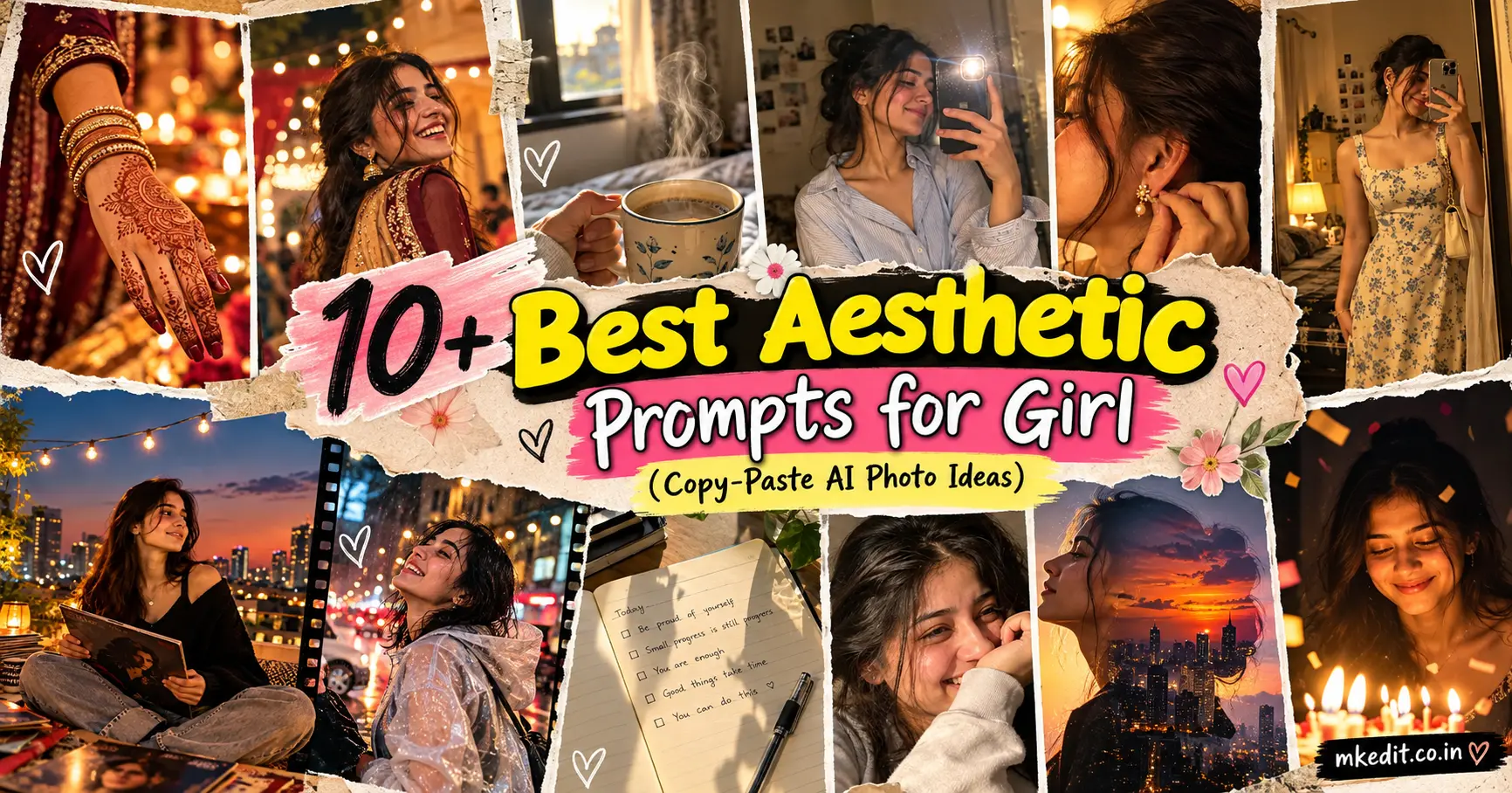
Most “aesthetic girl” prompt lists online repeat the same handful of setups with the adjectives swapped — a cafe window, a golden-hour portrait, a neon street. This list skips those. Every prompt below is built as a small scene with its own story, props, and camera logic, the same way a real photographer would brief a shoot. Some are single frames, a few are multi-photo grid collages, and each one is genuinely different from the next — not the same portrait recolored ten times.
What Makes These Prompts Different
A prompt that actually produces something interesting usually does three things a basic one skips:
- It gives the subject something to do. “Sitting” or “smiling” isn’t a scene. Adjusting an earring, catching a candle’s smoke, mid-laugh with a windblown dupatta — an action gives the model a real moment to render instead of a static pose.
- It includes small, specific props. A fogged-up bus window, a half-eaten cupcake, a cassette tape on a dashboard — specific objects are what make a scene feel imagined rather than generated from a template.
- It describes light the way a cinematographer would. Not just “soft lighting,” but where the light is coming from, what color it is, and what it’s touching.
If you’re editing your own photo, add a line asking the model to preserve your face and identity from the reference — each prompt below already includes one, phrased differently so you can see the range of ways to ask for it.
How to Use These Prompts
- With a reference photo: Upload your selfie or portrait first, then paste the prompt. The identity-preservation line in each prompt tells the model to keep your actual face instead of generating a new one.
- Without a reference photo: Delete the identity-preservation sentence and paste the rest as-is to generate a new AI portrait from scratch. Add hair color, ethnicity, or outfit color if you have something specific in mind.
- For grid or multi-frame prompts: Some AI tools render all frames well in one pass; others do better one frame at a time. If a multi-frame result looks muddled, run each frame as a separate generation and combine them yourself, or ask the tool for “one image, four-frame grid” explicitly.
1. The Morning Lock-Screen Grid
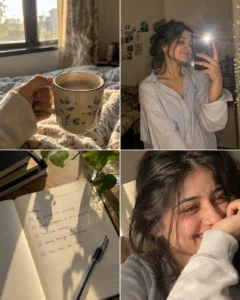
Built around the phone-widget aesthetic people actually screenshot and save — a weather widget, a half-written note, and a candid morning moment, laid out like a real four-frame collage instead of four unrelated portraits.
A realistic four-frame smartphone photo grid, 2×2 layout, styled like a personal aesthetic collage. Top left: a close-up of a hand holding a warm mug, steam rising, soft morning window light. Top right: a mirror selfie in a cozy oversized shirt, hair loosely tied, natural front-camera flash, slight motion blur. Bottom left: an overhead shot of an open notebook with handwriting mid-sentence, a pen resting across the page, sunlight casting a soft shadow. Bottom right: a close-up candid laugh, eyes crinkled, natural skin texture, soft daylight from a nearby window. All four frames share consistent warm, slightly desaturated morning tones and authentic smartphone photo quality, no beauty filter, visible natural texture throughout. Aspect ratio 4:5.
Use the attached reference photo for the person in every frame, keeping her face and identity exactly as shown, with no changes to her features.
Best for: A single Instagram carousel post or a moodboard-style save. Tip: Swap “warm mug” and “notebook” for objects that actually match your morning — a skincare bottle, a book, a pet — and the collage will feel personal instead of templated.
2. Monsoon Scooter Ride, Mid-Laugh

A candid motion shot instead of a posed one — the kind of photo a friend catches by accident, not one you’d ask for.
Use the uploaded reference image for the exact scrapbook collage layout, aesthetic, torn-paper frames, layering and overall composition. Replace the original subject/content with a cinematic rainy scooter ride: young woman laughing in a transparent rain poncho, wet hair, neon city lights, motion blur and dreamy bokeh. Keep the same vintage scrapbook feel, but make it more unique and premium with subtle film strips, handwritten notes, flowers, butterflies, tape and realistic paper textures. Warm amber + cool blue rainy-night color palette, authentic photography, aesthetic Instagram/Pinterest editorial look, natural candid moments, cohesive composition, high detail, 4:5 portrait.
Base this on the uploaded reference image and keep her exact facial structure and identity untouched throughout.
Best for: Monsoon-season posts or a candid feed photo that doesn’t look AI-generated. Tip: If the motion blur feels too heavy, add “moderate motion blur, face remains sharp” to keep the identity readable.
3. Get-Ready-With-Me Triptych

Three frames that tell a getting-ready story in sequence, borrowing the layered, decorative feel of a real GRWM reel rather than three separate portraits stitched together.
A three-panel vertical photo strip, styled like a getting-ready sequence. Frame one: a close-up of a hand spritzing perfume into the air, a fine mist catching warm vanity-light, soft focus on the background. Frame two: a close-up profile shot fastening an earring, natural skin texture, warm side lighting from a mirror bulb. Frame three: a full-length mirror selfie in a finished outfit, phone visible in hand, confident relaxed pose, warm ambient bedroom light. Consistent warm gold color grading across all three frames, authentic smartphone photo quality, soft film-style grain, no artificial smoothing. Aspect ratio 4:5.
Keep her face, skin tone, and identity from the reference photo completely unchanged across all three frames.
Best for: Outfit-of-the-day content or a “get ready with me” style post. Tip: Name the actual outfit color or style in frame three — a generic “outfit” often reads inconsistently with the mood set in frames one and two.
4. Birthday Candle Glow Close-Up

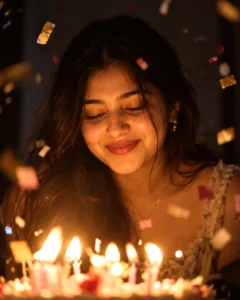
Uses a single light source doing all the work — a cliché in real photography for a reason, but rarely written into AI prompts with enough technical detail to actually look like it.
A close-up portrait lit entirely by candlelight from a birthday cake just out of frame, warm flickering orange glow illuminating the lower half of her face and catching in her eyes, soft focus on a few pieces of falling confetti frozen mid-air around her, gentle closed-eye smile as if about to blow out the candles, dark blurred background, warm color temperature with deep shadows, realistic skin texture under warm directional light, shot with a shallow depth of field on a 50mm lens. Aspect ratio 4:5.
Use the reference photo provided so her face and identity stay identical to the original, with nothing altered.
Best for: Birthday posts or any warm, celebratory single portrait. Tip: Ask for “practical light only, no fill light” if the result looks too evenly lit — a single candle should leave real shadow on one side of the face.
5. Rooftop Vinyl Night

A quieter evening scene built around a specific object — a record player — instead of generic string lights, which is what keeps it from feeling like a stock photo.
A wide evening portrait on a rooftop terrace, city skyline softly blurred in the background with scattered warm building lights, a small vintage record player and stack of vinyl records resting on a low table beside her, she sits cross-legged with a record sleeve in her hands, warm string lights strung overhead slightly out of focus, cool navy sky transitioning to warm amber near the horizon, natural relaxed expression, cinematic color grading balancing warm foreground light against the cool night sky. Aspect ratio 16:9.
Reference the uploaded photo closely and preserve her exact face and identity without any modification.
Best for: Wide banner images or a moody evening feed post. Tip: Swap the record player for a specific hobby object of your own — a camera, a sketchbook, a guitar — and the same lighting setup still works.
6. Mehndi Hands and Candid Dupatta Motion

A two-frame collage that separates detail from emotion instead of cramming both into one busy shot — one frame for intricate close-up detail, one for genuine motion and expression.
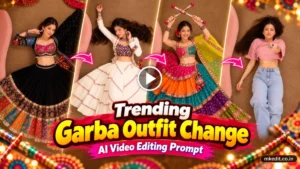
A two-frame photo collage from a festival celebration. Left frame: an extreme close-up of a hand with intricate henna mehndi patterns, delicate gold bangles catching warm light, softly blurred festival lights in the background. Right frame: a candid mid-motion shot of her laughing with her head turned slightly away, a dupatta caught mid-flow in the wind, warm string lights and soft bokeh behind her, festive but natural, unposed energy. Both frames share warm amber and maroon tones, realistic skin and fabric texture, authentic photography feel with no artificial gloss. Aspect ratio 4:5.
Draw from the attached reference image and keep her original face and identity precisely as captured, with no edits.
Best for: Festival-season posts (Diwali, Eid, or any celebration) without leaning on the usual full-outfit portrait. Tip: Change “dupatta” to whatever garment actually moves in your outfit — a scarf, a saree pallu, a coat — the wind-motion detail is what sells the candid feel, not the specific fabric.
7. Overhead Desk Flat-Lay With a Caught Hand

Most “study aesthetic” prompts show a person sitting at a desk. This one treats the desk itself as the subject and lets a hand entering the frame carry the human presence — a genuinely different composition.
“Use the reference girl images as the main visual identity. Create a cozy top-down scrapbook journal scene on a wooden desk, with multiple torn-paper photos of the same girl naturally arranged across the open journal, matching her face, hairstyle, outfit and earrings from the reference. Add dried flowers, pearls, handwritten notes, washi tape, and a small music-player card. Warm cinematic lighting, elegant vintage collage aesthetic, realistic photography, natural textures, 1:1.”
Best for: Pinterest-style aesthetic boards where the person doesn’t need to be fully visible. Tip: This one works well even without a face reference since the identity is carried mostly through the hand — a good option if you want a personal touch without a full portrait.
8. Closet Try-On, Caught Between Frames
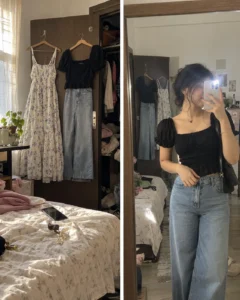
Instead of one finished mirror selfie, this pairs the messy “in-progress” moment with the polished one — a contrast most single-frame prompts miss entirely.
A two-frame before-and-during photo set. Left frame: a slightly messy closet with two outfit options hanging on the door, a phone resting on the bed, natural window light, casual unstaged energy. Right frame: a mirror selfie moments later, wearing the chosen outfit, one hand adjusting a sleeve, natural front-camera flash mixing with daylight, relaxed candid expression, faint reflection of the messy closet still visible in the mirror’s edge. Consistent natural color tones across both frames, authentic smartphone photo quality, no over-processing. Aspect ratio 4:5.
Use the attached photo as the identity source and keep her facial features and skin tone completely unaltered in both frames.
Best for: Fashion or outfit-focused content that wants to feel less staged than a typical OOTD post. Tip: Leave the messy closet detail in — that’s the element that makes it read as candid rather than a produced mirror shot.
9. Silhouette Filled With the Skyline

A double-exposure style concept rather than a straightforward portrait — the kind of creative direction competing prompt lists almost never include.
A double-exposure style portrait, her side profile silhouette filled with a faint overlay of a city skyline at dusk, warm orange and purple gradient sky blended softly into her hair and shoulders, building lights visible as small glowing points within the silhouette, the outer edge of her profile kept crisp while the interior holds the blended skyline texture, artistic and painterly but photographically grounded, soft grain throughout. Aspect ratio 4:5.
Base the silhouette shape on the uploaded reference photo’s profile and hairline, keeping her actual features recognizable and unchanged.
Best for: A standout profile picture or a creative feed post that isn’t a straightforward photo. Tip: If the model over-blends the face, ask for “silhouette edge sharp, interior texture soft” — that keeps the shape recognizable while the effect stays artistic.
10. Passport-Style Portrait With a Personal Twist

A clean, minimal format most people only think to use for official documents — reframed here as a genuinely usable aesthetic ID-style photo with one small unexpected detail.
Use the reference image for the girl’s face, features, saree, jewelry, bangles, and overall identity. Create a unique aesthetic 4-panel editorial collage with different candid poses, warm golden light, soft film grain, dreamy bokeh, subtle floral elements, elegant composition, natural skin texture, and a premium Instagram/Pinterest aesthetic. Keep the same person consistent across all panels, realistic photography, soft pink-gold color palette, minimal scrapbook details, 3:4 aspect ratio.
Customization Tips for Better Results
- Give every scene a prop or an action. If a prompt you write feels flat, ask what the person is actually doing with their hands, and describe that instead of just their pose.
- Vary your identity-preservation phrasing. Repeating the exact same sentence across every prompt in a batch can make some tools apply it too rigidly. Reword it each time, the way each prompt above does.
- Match aspect ratio to the platform. Use 4:5 or 1:1 for Instagram feed posts, 9:16 or 3:4 for Stories and Reels covers, and 16:9 for banners or wide Pinterest-style images.
- For grid prompts, name the layout explicitly. “2×2 grid” or “three-panel vertical strip” gets a far more reliable layout than just listing frames without saying how they’re arranged.
- Control realism directly. Add “visible skin texture, natural pores, no beauty filter” if results look too smooth, or “soft natural retouching” if they look too rough.
Common Mistakes to Avoid
- Describing a pose instead of a moment. “Standing and smiling” is a pose. “Mid-laugh while adjusting a windblown scarf” is a moment — the second one gives the model something to actually render.
- Leaving props vague. “Some drinks” or “nice accessories” produces inconsistent results. Name the object specifically.
- Overloading a single-frame prompt with a multi-scene story. If a concept genuinely needs more than one moment, write it as a grid or multi-panel prompt instead of cramming it into one frame.
- Forgetting the aspect ratio. Without it, most tools default to a format that may not fit where you actually plan to use the image.
- Copying the same identity-preservation line word-for-word across a whole batch. It works, but varying the phrasing (as done above) tends to read more naturally to the model and avoids overly literal, repetitive edits.
Frequently Asked Questions
Do multi-frame collage prompts work in ChatGPT, Gemini, and Nano Banana?
Yes, though results vary. Nano Banana and Gemini tend to handle grid layouts consistently in one generation. If ChatGPT struggles with a four-frame grid, generate each frame separately and combine them, or explicitly ask for “one single image containing a 2×2 grid” rather than “four photos.”
Can I use these prompts without uploading a photo?
Yes. Remove the identity-preservation sentence from any prompt and it works as a standalone text-to-image prompt, generating a new AI portrait rather than editing your photo.
Why does my multi-frame result look inconsistent between frames?
This usually happens when lighting or color grading isn’t described as shared across frames. Add a line like “consistent lighting and color grading across all frames” at the end of the prompt to keep them visually unified.
What’s the best aspect ratio for these prompts?
Use 4:5 or 1:1 for Instagram feed posts, 9:16 or 3:4 for Stories, Reels covers, and phone wallpapers, and 16:9 for banners or wide Pinterest-style images.
Can I combine elements from two different prompts?
Yes — borrowing one specific detail, like the candlelight from prompt 4 with the rooftop setting from prompt 5, usually works better than merging two full prompts, which tends to overload the description.
Final Thoughts
The prompts that actually stand out are the ones written like a real scene, not a mood board caption. Give the subject something to do, name the objects around her specifically, and describe light the way a photographer would. Once you’ve got that structure down, you can build endless original variations just by changing the action, the props, or the setting — without ever repeating the same portrait twice.

Hi, I’m Deepak Verma. I run MKEdit because I got a little obsessed with how good AI photo prompts can look when they’re written properly and paired with the right AI tools to generate high-quality images. Everything you see here, I’ve generated and tested myself first. If it’s on the site, it’s because it actually gave a good result — not just a random idea I typed once