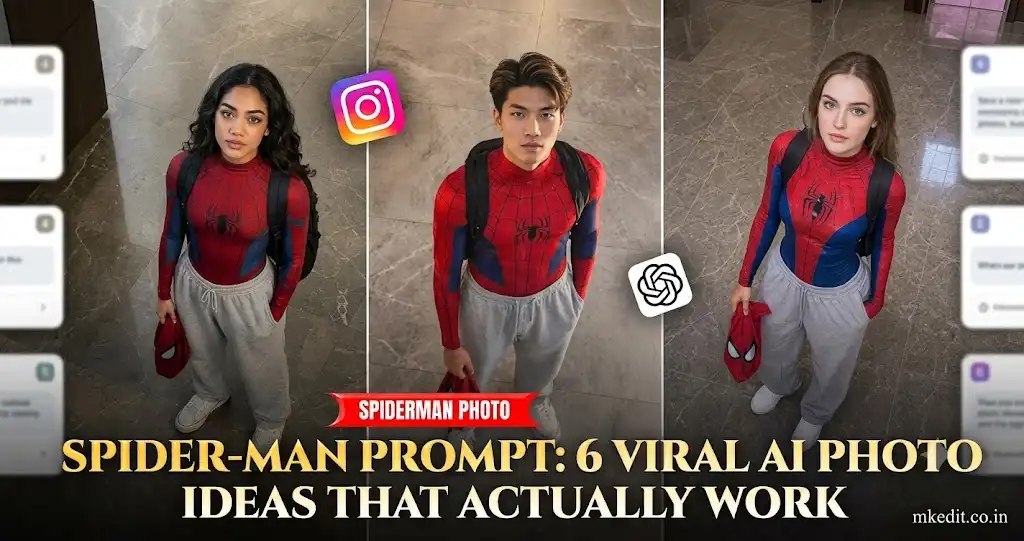
Spider-Man edits are everywhere right now. The best ones don’t look like movie posters—they feel like a real person who somehow became a superhero for a day. That mix of casual clothing, cinematic lighting, and preserved facial details is what makes these images stand out.
I generated these prompt variations while testing portrait photos with Gemini and ChatGPT image generation. One thing I noticed is that clean front-facing selfies with even lighting consistently produced better facial preservation than heavily filtered Instagram photos.
Before You Generate
Upload a high-quality portrait where the face is clearly visible. Avoid sunglasses, heavy shadows, or cropped selfies.
Every prompt below is written for a vertical image because that format works much better for Instagram Reels, Shorts covers, and mobile wallpapers.
Spider-Man AI Prompts
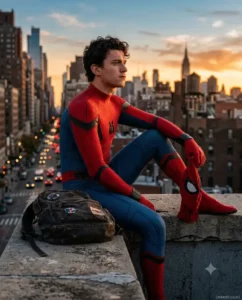
1. Rooftop Sunset Hero
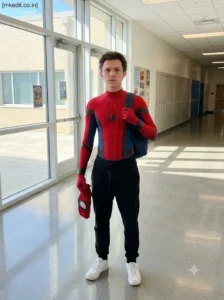
2. School Day Spider Hero
Use the uploaded image as the identity reference and faithfully preserve the person’s face and natural appearance. Create a high-angle full-body scene where the character stands inside a modern school hallway wearing the upper half of a Spider-Man-inspired suit with relaxed black joggers and white sneakers below. One hand carries the superhero mask while the other adjusts a backpack strap. Bright daylight enters through large glass windows, creating soft reflections on the polished floor. Hyper-realistic mobile photography style, crisp textures, natural proportions, vertical portrait orientation, ultra-HD resolution. Place a small “[mkedit.co.in]” signature in the upper-left corner.
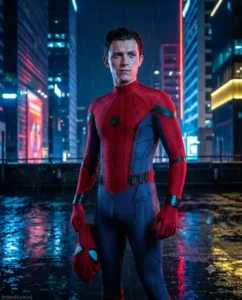
3. Rainy Night City Scene
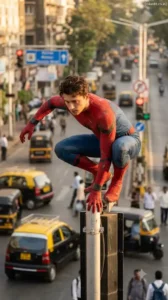
4. Swing Ready Street View
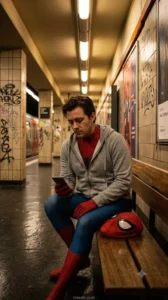
5. Quiet Subway Platform
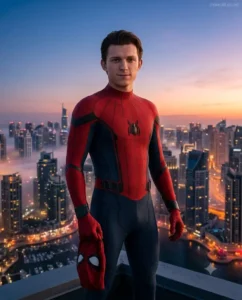
6. Skyline Dawn Portrait
A Small Thing I Noticed During Testing
One prompt wasn’t always enough.
When I used a normal phone selfie, the first generation sometimes changed the jawline slightly. Running the exact same prompt a second or third time usually corrected it without changing the overall composition. In my tests, the third generation gave the most consistent facial match.
Best Results
- Use a clear front-facing portrait.
- Avoid beauty filters before uploading.
- Generate in a vertical aspect ratio.
- Keep the face uncovered in the reference image.
- If the face changes too much, regenerate instead of rewriting the entire prompt.
Frequently Asked Questions
Can I use these prompts with ChatGPT image generation?
Yes. They also work well with Gemini and other modern AI image models that support reference photos.
Will the AI keep my face the same?
A clear reference photo gives the best chance of preserving your facial features, although small differences can still happen between generations.
Which aspect ratio is best?
A vertical 4:5 image is ideal for Instagram posts, while 9:16 works well for Stories and Reels.
Can I change the background city?
Yes. Replace the New York-style skyline with Tokyo, London, Mumbai, or any city you prefer.
Can I wear casual clothes instead of a full superhero suit?
Absolutely. Mixing everyday clothing with superhero elements often creates a more realistic and viral-looking image.
Do these prompts work for both men and women?
Yes. The prompts are gender-neutral and can be adapted simply by changing clothing, hairstyle, or pose if needed.
Simple Prompt Tweaks You Can Try
You don’t have to keep these prompts exactly the same. Small changes can completely change the mood while keeping the Spider-Man theme.
- Replace sunset with blue hour or rainy evening.
- Swap the backpack for a skateboard, camera, or messenger bag.
- Change the location to a college campus, subway station, basketball court, or apartment rooftop.
- Ask for a cinematic portrait instead of a full-body composition.
- Replace New York with your favorite city skyline.
- Use soft overcast lighting for a more realistic everyday look.
Common Mistakes That Make Spider-Man Images Look Fake
After generating quite a few Spider-Man photos, I noticed these mistakes show up often.
- Adding too many glowing effects makes the image look like a video game instead of a real photo.
- Very low-quality selfies usually cause the AI to change facial features.
- Requesting extreme action poses sometimes creates awkward hands or stretched body proportions.
- Adding too many background details at once can distract from the subject.
- Overusing dramatic HDR lighting often makes skin tones look unnatural.
Customize These Prompts Even More
If you want something different from the usual Spider-Man rooftop edit, here are a few ideas that worked well during testing.
- University Student: Spider-Man suit partially hidden under a college hoodie with books in hand.
- Street Photography: Walking through busy city streets while carrying the mask casually.
- Coffee Shop Break: Sitting near a window after patrol with warm café lighting.
- Metro Station: Waiting for the train while holding the mask inside a backpack.
- Winter Version: Spider-Man-inspired jacket layered over the suit with light snowfall.
- Minimal Portrait: Close-up headshot with blurred city lights behind.
Recommended AI Settings
| Setting | Recommendation |
|---|---|
| Orientation | Vertical (4:5 or 9:16) |
| Style | Photorealistic |
| Lighting | Natural cinematic lighting |
| Face Reference | Clear front-facing portrait |
| Quality | Ultra HD / 8K |
| Depth of Field | Natural background blur |
| Expression | Relaxed and realistic |
Final Thoughts
A good spider-man prompt isn’t about adding more superhero effects. It’s about making the character feel believable. A simple rooftop, natural lighting, and a well-preserved face usually create a much stronger image than filling the scene with explosions or glowing effects.
Feel free to adjust the locations, clothing, weather, and camera angles to match your own style. Once you find a version that works with your reference photo, save it—you can reuse the same structure for dozens of different superhero-inspired edits without starting from scratch.

Hi, I’m Deepak Verma. I run MKEdit because I got a little obsessed with how good AI photo prompts can look when they’re written properly and paired with the right AI tools to generate high-quality images. Everything you see here, I’ve generated and tested myself first. If it’s on the site, it’s because it actually gave a good result — not just a random idea I typed once